 TideTone
How to find handpan notes: Ding, tone fields and pitch names
Start by locating one note on your own instrument. Physical positions, pitch names and notation numbers describe different things; you do not have to memorise a complete map today.
Read the real app: start with these four places
This real TideTone screenshot shows the 好朋友 D Kurd 10 virtual handpan with pitch names and position labels together. Start with the enlarged handpan area; there is no need to memorise all ten notes.
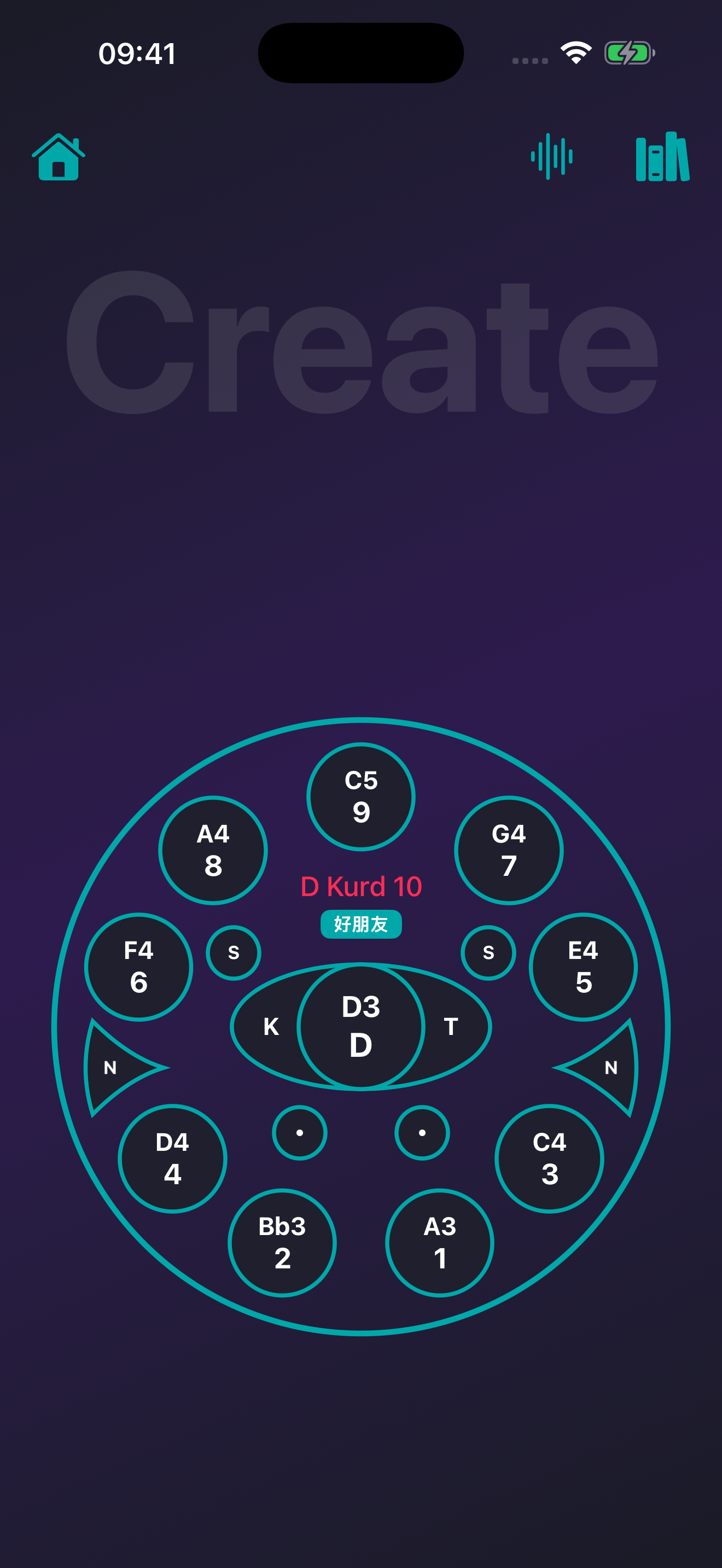
- Start in the centre: D3 / D
The central circular field reads D3 with D below it. D3 is the pitch name; D is this interface’s Ding label. It does not mean play D and then 3.
- Next, lower right: A3 / 1
Look down and right from the centre. A3 has 1 below it: the upper label gives pitch, the lower label gives this layout’s position number. Numbered-notation 1 is a different concept.
- Compare neighbours: Bb3 / 2 and C4 / 3
Bb3 is lower left and C4 lower right. Position numbers do not simply increase clockwise, so read the labels instead of guessing the next pitch from proximity. The b in Bb is a flat sign: Bb3 is not B3.
- Finally, at the top: C5 / 9
C5 and the lower-right C4 share the letter C, but C5 is an octave higher. The number attached to the pitch letter identifies the octave; position 9 identifies this layout’s field.
Try it: from tone field to grid
Find A3 in the app. In the notation editor, select an empty cell first, then tap A3. Switch to pitch-name view, confirm that cell reads A3 and play it. You have connected where to tap, which pitch to enter and when it sounds.
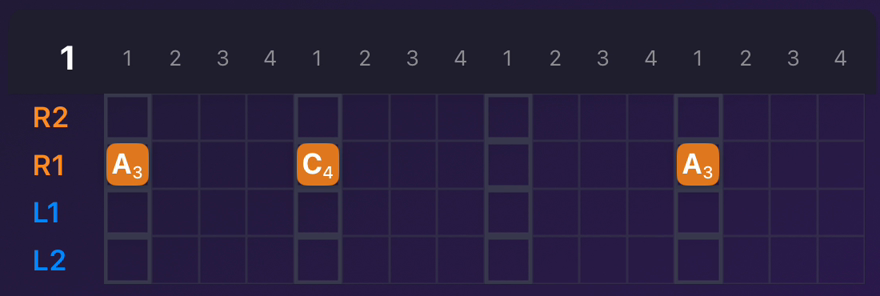
The image also includes S, K, T, N and dot controls; they are not pitch-name labels for this exercise. Use your maker’s layout for a physical instrument rather than assuming the app’s position numbers match.
On small screens, scroll the diagram horizontally. Each step is explained in the text below.
What is the Ding?
Ding commonly names the central tone field. Tuned fields also surround it, and a dimple is only part of a field. The word Ding alone does not specify a pitch. Use your maker’s pitch list and layout to identify the actual notes.[1]
What do D3 and D4 mean?
D names a pitch class; 3 and 4 identify octaves. D4 is an octave above D3, not physical field number four. A3 and D3 are different notes despite sharing a numeral. Treat each as a complete name before memorising relationships.
Why do two notation systems show different numbers?
A position number identifies a location in a particular layout. Jianpu numbers indicate degrees relative to a reference. In TideTone’s D Kurd 10 view with 1=F, position 1 maps to A3, displayed as jianpu 3. That is not a universal map for every instrument. Check pitch-name notation when unsure.
Try finding just two notes
Keep the maker’s map nearby. Locate the central field and an easy outer field, touch each lightly and associate its sound with its name. Return to those two next time before adding another. Ask the seller for a layout if none is supplied; size alone is not a precise pitch label.
Can a tuner identify them?
It can provide clues, but a handpan field contains multiple frequency components, so an app may show a partial or jump between readings. Check the supplied note list and isolate one light strike. One reading cannot establish that the instrument needs retuning.
Can I follow a different layout?
You can borrow a rhythm, pause or sound idea and adapt it to your available notes. Reproducing a melody exactly requires checking pitches and octaves. A mismatch may simply mean the instruments contain different notes.
Sources and scope
[1] Handpan 360 · Anatomy of a Handpan
The source supports the background on handpan anatomy and tone-field names. Screenshots, position numbers and notation steps use TideTone’s 好朋友 D Kurd 10 as an example, not a universal maker layout. Check your own instrument’s pitch list.
My screen looks different. What should I check?
First check that you selected D Kurd 10. If you see notation numbers instead of A3 or C4, use the pitch-name display toggle. Do not change the scale just to change the labels.
You have completed this exercise when you can point to A3, explain that position 1 labels that field in this layout, and enter A3 into a selected grid cell. If your physical instrument has a different layout or no A3, use its maker’s pitch list rather than copying the pictured location.