 TideTone
 Pro
Export an animated handpan score video
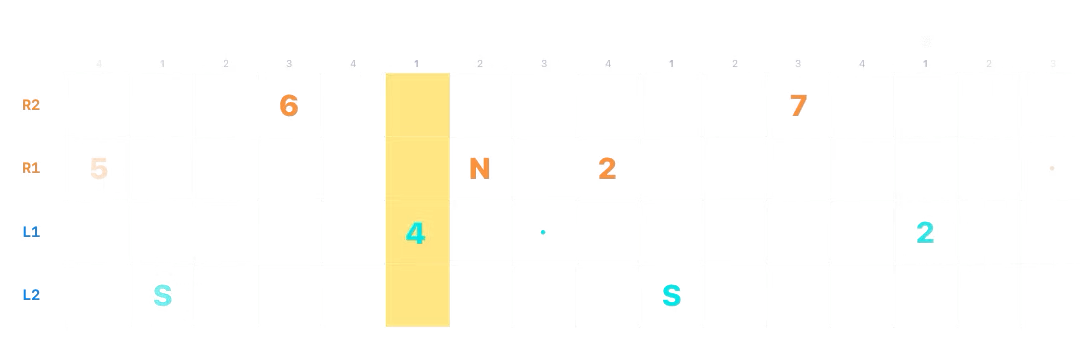
TideTone Pro turns your own score into a silent animated video. Preview the motion, choose a range, and export with a transparent, dark or light background for teaching or for compositing with a performance in your video editor.
A frame from a transparent score export
What you need before exporting
Score video export is a Pro feature for a user-created score. It is not available for a Pro Library score, because those scores are for playback and practice only. Pause playback in your own score, open Share, and choose the score video export action.
The export sheet includes a dynamic preview, range selection, and background settings. Review the preview and range before exporting so the clip starts and ends with the phrase you intend to show.
Choose the right background and file
- Transparent: exported through Files as an HEVC-with-alpha MOV. Files is the intended place to use it, because Photos may display alpha video incorrectly.
- Dark or light: exported as MP4.
Choose the background for where the finished clip will be shown. The exported score animation has no audio. TideTone does not import or composite a video of your playing; add and sync performance audio later in your video editor if you need it.
A clear teaching clip from two bars
- Use a two-bar excerpt with a visible start, a clear answer or ending, and only the notation you want a learner to follow.
- Set the export range to those two bars. Check the dynamic preview for the first note, the ending, and any empty space you want the viewer to see.
- Choose the background that fits the destination, then export. Keep the original score if you may need to revise the notes later.
A video is useful when you want to demonstrate timing and score movement. If the recipient needs to change notes, continue practising, or make their own version, send the editable score instead.
Video for viewing; score for editing
Exported score video is not an editable score. For an editable handoff, use TideTone teaching sharing from Share on a user-created score. The receiving player can then work with the score itself rather than a rendered video.